Thursday, August 7, 2025

aprs.fi iPhone app: New user guide and other features

A few updates have been released for the aprs.fi app recently, and I haven't been posting about them. It's about time!

Version 2.7.1 in August 2025 added a brand new User Guide for the aprs.fi iPhone app, which is available online and within the app. It contains much more information than the old little Help view, and provides proper documentation for things like attaching a TNC/radio. A new, complete translation to the Slovak language was also enabled, thanks to a contributor! Thank you!

Version 2.7.0 in July 2025 added:

  • Manual configuration of TCP KISS TNCs (you know, like we used to do in the 1990's, by typing IP addresses and port numbers, or maybe DNS hostnames if we were being fancy)
  • GPU accelerated, faster and smoother oscilloscope view in the DSP AFSK TNC for level adjustment. The refresh time and decay time are adjustable.
  • Waterfall view, because why not - it runs cool on the GPU!
  • A little less CPU usage, and no sample format conversions, in the DSP TNC.


Version 2.6.2 in July 2025:
  • Fresh versions of the APRS device identification database are automatically downloaded from the upstream source - but only when modified.
  • The DSP TNC can send back-to-back frames when necessary, reducing airtime and congestion
  • A new TNC developer view for people implementing KISS modems: Support sending 1-3 small and 1-2 large packets, back-to-back. Useful for buffering tests and back-to-back packet support. Packets are sent with a "NOGATE" path, which should prevent them from traversing the APRS-IS. Tested with the AFSK modem and the Mobilinkd TNC3 (both seem to support back-to-back transmit and receive correctly).
  • Fixed a few crashes in the APRS text message queue & database handling.
Version 2.6.1 in October 2024:
  • It’s now possible to change the account callsign/nickname from within the app (More -> My account).
  • A few improvements in the station profile rename feature, to improve the chances of having an AX.25 compliant callsign-SSID by default.
Version 2.6.0 in October 2024:
  • New button in the map view to change the size of station symbol graphics and callsign labels. I'm getting older and my age vision is making progress, and I'm sure I'm not the only one. It's also great when using APRS in a car, or perhaps on an iPad, and looking the device when a bit further away.
  • Made the map buttons a little bit larger, overall.
  • A brand new symbol for RVs (Recreational Vehicles) to replace the rather boring "RV" text! This new symbol can also point to the direction the vehicle is moving. The new symbol is available in the open source APRS symbol set, too.
  • More @3x high-resolution graphics to make things look really sharp on the latest devices.
Version 2.5.4 in October 2024:
  • 1-year Extra Features subscriptions now support Family Sharing! Only one subscription needed for the whole family.
  • Implemented device identifier detection for Mic-E position packets received from a TNC, with the help of the aprs-deviceid database.
  • Messaging: The app used to crash when deleting threads without actually selecting any threads for deletion first. This might seem like an odd thing to do, but as a paying customer you have the right to delete all of 0 threads, and the app should certainly not crash. It no longer does.
  • Messaging: The app used to crash when the "Select all" button was pressed, but no threads existed for selection. Fixed the silly little bug so that all of 0 threads can now selected without a crash.
  • Messaging: Only show relevant actions in the message context menu (when pressing a message for a longer time). It no longer suggests you to "retransmit" a received message.
  • Messaging: Links are now clickable in messages, and shall open up your preferred web browser.
  • TNC: When stopping the DSP modem using the Disconnect button, the modem now actually closes the audio input device, and the recording indicator goes away.
Additionally, many of the versions included updates to translations / localisations contributed by users of the application. Thank you!

Bugs were fixed, frameworks were updated, and translations updated in most of these versions, too.

Thursday, June 29, 2023

CG Antenna GW-1000 APRS iGate has serious bugs

The CG Antenna GW-1000 APRS iGate gateway appliance contains faulty firmware which causes severe problems to APRS messaging worldwide.  The IS -> RF gateway feature must be disabled on all GW-1000 devices until the bug is fixed by CG Antenna, and firmware is updated on the devices.  Please contact the vendor for further instructions.

CG Antenna has asked me to publish this information so that owners of faulty iGates would more likely learn about the issue. They mentioned a special TTL level serial cable / adapter may be required for the update process.

Description of the issue

When enabled, the APRS-IS to RF (transmit) iGate transmits packets to the RF unmodified.  It does not use the correct 3rd party packet format documented in the iGate specification.  Because of this, other iGates near the faulty iGate assume all of those distant stations are active on the local RF channel, while in fact they may be on the other side of the world.

This causes the other local iGates to transmit APRS text messages destined to all of those remote stations to the local RF channel.  They're operating correctly - the unmodified packets sent by the CG-1000 seem like they would have been transmitted locally on RF.

When a lot of messages are sent, such as during the APRS Thursday event, the local RF channel will be seriously congested.  The CG Antenna GW-1000 device itself will transmit a high rate of packets, packets which are destined to remote stations and which should not be forwarded to RF.  The other iGates confused by the GW-1000 cause additional unnecessary traffic.

Because of the congestion many packets are also delayed long enough to cause the 30-second duplicate packet filtering window to be exceeded.  Packets sent to RF by the GW-1000 will be looped back to APRS-IS and redelivered everywhere in the world.  A single GW-1000 gateway in Switzerland caused delayed duplicate APRS messages to be delivered worldwide.

There are currently GW-1000 gateways operating elsewhere, but it is difficult to track them down and get them disabled.  They are hard to identify, because they send the packets to RF unmodified, without using their own callsign in the 3rd party packet frame like they should.

Timeline

I have notified CG Antenna of the issue by email on January 14th, 2023, and they confirmed receiving the report on January 17th.  On February 4th they confirmed that they have to make a firmware update.  They have not published updated firmware on their downloads page yet as of June 29th, 2023. After 5 months, on June 21st, they updated their web site to note that the feature is faulty and needs to be disabled.

The bug has been present in the firmware since the launch of the product, but only became apparent when the APRS Thursday event got people to send more APRS messages, and some of those messages were originated near GW-1000 iGate.

Learnings

Yes, the APRS messaging feature is brittle and it's easy to cause a bit of a mess.

If you produce and deliver a product like this, make sure it is easy for customers to upgrade the firmware without special tools. Be prepared to ship updated firmware in a timely manner if there is a serious issue.

If you wish to implement an APRS iGate, be sure to fully read the APRS iGate spec, and the details page, and fully understand it. If there's something that you don't understand, please don't do it before obtaining more information or help to understand it.

This is not the only current issue out there - there are other software causing similar issues. I'll make an update in the APRS iGate implementation tips document.

The issue was originally debugged and described in this groups.io APRS group thread.

Tuesday, March 1, 2022

Radiosonde iGates are quite a mess, and they seriously need some fixing

UPDATE: The radiosonde data feeds have almost completely been moved to sondehub.org and the APRS-IS is no longer involved or affected by it. Thank you!

Saturday, February 19, 2022

Baofeng & BTech APRS-K1 & iPhone problems

TL;DR: It seems like many Baofeng radio units (UV-5R, UV-82, etc) do not work with the aprs.fi iPhone app using the BTech APRS-K1 cable. They do not work with any iPhone app - I tried all the other APRS apps I have, and other non-APRS apps recording or playing back Audio. It seems a bit like a build quality issue as it does not depend on the radio model, but rather the individual unit. It works for some people, but for many it doesn't. Other radios I have work fine. The Android phone I have works with the UV-5R, so it must have something to do with the circuitry on that side as well.

There's a 1-capacitor fix/workaround in the end!


Many users of the aprs.fi iPhone app have purchased an affordable Baofeng radio, and the BTech APRS-K1 cable, and have then tried to use those for APRS. It has worked for some users, but for many it has failed miserably. This setup does not have a PTT line to key the transmitter – instead, VOX is enabled so that the radio will transmit whenever there's audio coming from the iPhone or iPad.

Users have reported that as soon as the aprs.fi DSP modem is enabled ("Connect TNC" is pressed in the iPhone app), the Baofeng transmitter goes on, and never goes off. When "Disconnect TNC" is pressed in the app to stop the modem, the transmitter goes off a second or two later.

Naturally, at that point, the first guess would be that the modem would be emitting some noise, which would trigger the VOX in the Baofeng. But it doesn't, if you attach earphones and listen, or if you look at the modem output with an oscilloscope.

It doesn't depend on the radio model - UV-5R or UV-82. Some units work, some don't. I had only tested the app with a Puxing PX-777, a Kenwood TH-D72 and a Kenwood TH-D74, all using the same BTech APRS-K1 cable, as they all are using the same mic/headphone connector ensemble. All of them work fine. Well, as well as a VOX-driven APRS transmitter can work, i.e. not great, as the transmitter keys up slowly and goes off very slowly due to the VOX delays.

So a few weeks ago I finally ordered an UV-5R so that I could figure out what exactly is going on. I have a Siglent digital storage oscilloscope which allows me to look at the three audio channels between the iPhone and the radio: left & right headphone outputs, and the microphone input.

I also bought a 4-wire 1-meter TRRS extension cable from Ebay, cut it up and made a 10 cm extension cable with exposed wires where I could attach the oscilloscope. The JAMEGA Gmbh cable is awful - no shielding/braid at all on the cable, and they even sell a 10-meter version. Not good for low-level audio signals. But it'll work for 10 cm.


The first thing to test: plug in just the APRS-K1 cable, without a radio at the other end, and see that the inputs and outputs on the adapters and cables are fine, and the scope sees the right things. In this oscilloscope screen shot you see the L/R headphone outputs on the bottom, when a packet starts to go out. The blue line on top is the microphone line, which has a little high-frequency noise on it, as it is a low-level high-impedance wire which is not attached to anything on the other end.


Ok, that seems fine. The lines are quiet when the app is not transmitting a packet, and the waveform seems alright when it is transmitting. But what happens when I attach the APRS-K1 cable to a Baofeng without touching oscilloscope settings? This! All the time! It does not matter whether the Baofeng is powered on or off. Attach a Kenwood or a Puxing, this does not happen. There's a high-frequency signal on the cable, on all 3 pins.


If we zoom in to it on the frequency scale, we find a 473 kHz signal on all 3 wires. The frequency is drifting, so it's probably not sourced from a good oscillator / clock reference. Click on the image to see a higher-resolution screen shot - frequency counter is in the top right corner, level measurements on the panel below the plots. Pretty high-level, so if the Baofeng is powered on, VOX probably keys up the transmitter. The frequency is so high that you won't hear any audio being transmitted if you listen to the transmission with another radio. This is how it looks with the iPhone and a Belkin Lightning-3.5mm adapter.


With the Belkin lightning-3.5mm adapter, levels are 150 & 330 mV L/R, frequency is about 470 kHz. 

If I turn on the Baofeng, the VOX triggers, transmitter goes on, and on the oscilloscope the only difference is that there's some high-frequency noise on wires, which can be expected as there is a 5W transmitter on the table. Even though it's transmitting to a dummy load instead of an antenna, this is to be expected.


This is the same thing, without the Belkin adapter, when attaching directly to the 3.5mm connector of my iPad - levels are lower at 20 & 110 mV L/R, frequency is 555 kHz. Baofeng is off, so no high-frequency noise from the transmitter.


Now, the interesting detail is that this only happens when the iPhone audio interface (A/D and D/A converter chip & amplifiers) are powered on and capturing audio. Could it be a feedback loop of some kind, between the A/D D/A converters and the circuitry on the Baofeng, with the A/D/A converter leaking the 500 kHz signal back and amplifying it? Or an oscillator is formed together with the Baofeng?

The iPhone has a power management system, where unnecessary components are powered off to conserve battery power. If any application (Voice Memos, Camera app in video capture mode, or the aprs.fi app) starts to record audio from the microphone input, the electronics of the A/D and D/A converters are powered on. This explains why the transmitter goes on when you start recording audio on the iPhone, or when you turn on the modem in the aprs.fi app. If you're wearing headphones attached to the iPhone and start audio playback from any app, or start recording in one of those apps, you can even hear a small "pop" sound in the headphones - it's the D/A converter waking up! It looks like this on the oscilloscope:


Because someone reported the same Baofeng + APRS-K1 cable setup works with APRSDroid on an Android phone, I tried it with my Nokia here. Yes, it does work, so there must be some difference in the audio circuitry or how it is used!

On Android, the A/D and D/A circuits seem to be powered separately. Georg DO1GL says that APRSDroid only outputs audio samples when it is transmitting a packet, and captures audio samples continuously for the receive to work. When looking at it on an oscilloscope, there is a 260 mV DC offset on one headphone audio channel when it's not transmitting. The DC offset goes away during transmit, and some time after the packet has ended, the DC offset comes back. There is also some additional noise on the output of the Android phone for some time after the packet has gone out, and the noise stops when the 260 mV DC offset appears. It would seem to me that the D/A is powered on only when audio goes out, and it can be powered off even when A/D conversion is taking place.

On the iPhone it seems to me that the D/A cannot be powered off independently. All audio-recording applications which I tried cause the D/A to be powered up and the strong 500 kHz signal to be generated if attached to the Baofeng. I tried all the APRS apps with DSP modems, and several other audio-capturing applications, and they all trigger the noise, if my Baofeng is attached.

Oh well. If it's feedback or oscillation, can we fix it by adding capacitance? Turns out we can!


I'm not much of an electrical engineer, but sometimes you can work around issues like this by just adding a bit of inductance or capacitance somewhere in a very experimental fashion, without applying too much science or math.

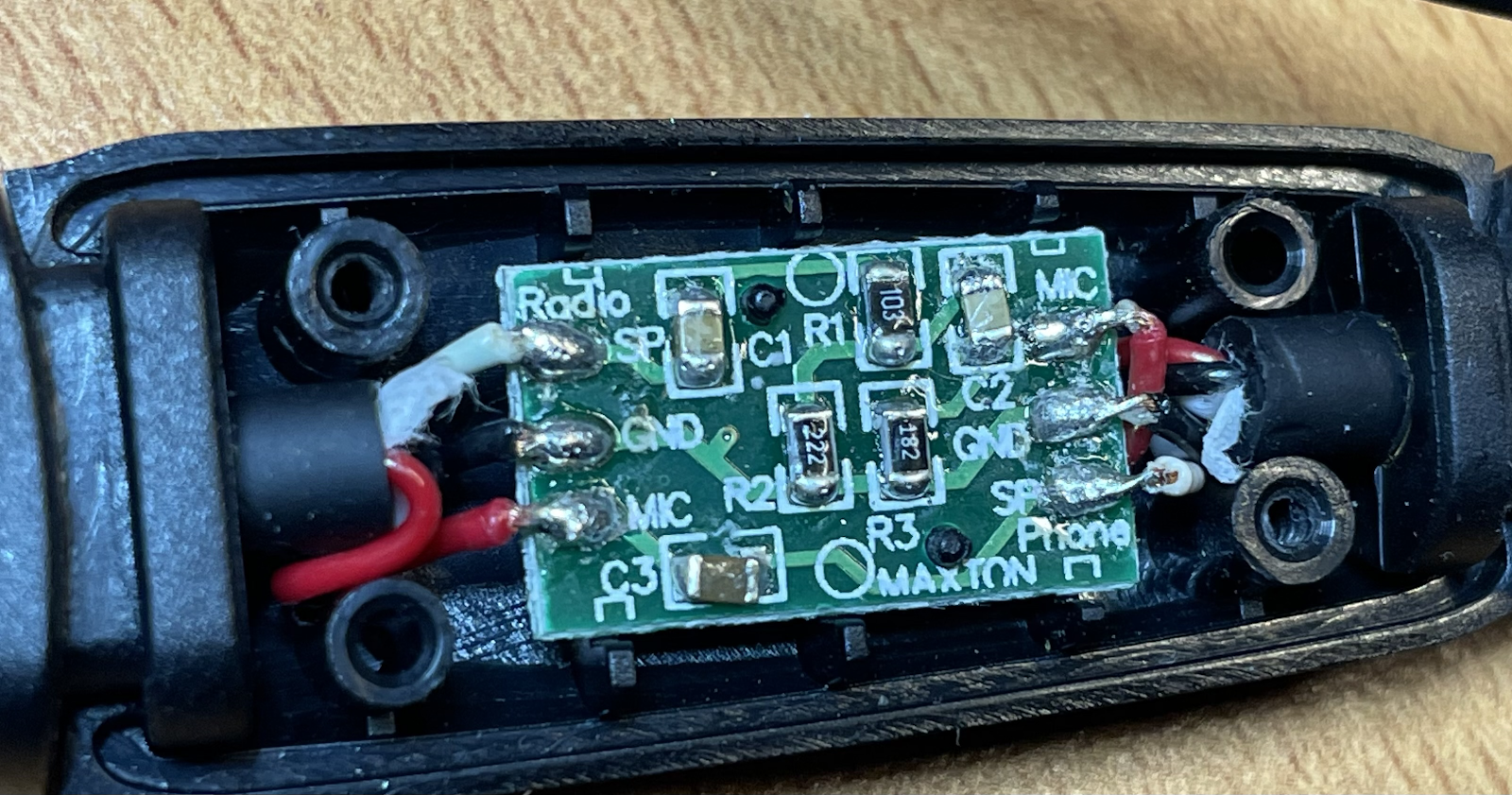
If you peel off the sticker on top of the APRS-K1 dongle, and open the two small Phillips screws, you'll find a small circuit board with a few capacitors and resistors. In this picture, the radio is attached to the left side, and the iPhone is attached to the right side. Red wire is the microphone wire on each side, white is the earphone wire, and black is ground. No isolation transformers.

The iPhone-to-radio-mic connection has just a single 100 nF capacitor for blocking DC, on the bottom of the circuit board. The radio speaker -> iPhone mic path, on the upper side of the board, from left to right, has a series capacitor (10 nF), a 2-resistor voltage divider (10 kOhm top, 2.2 kOhm bottom half), a second series capacitor (guessing 10 nF but couldn't measure), and a 1.8 kOhm resistor to ground, which tells the iPhone that a microphone is connected.

I checked with the oscilloscope that the 500 kHz signal was strongest on the bottom right corner, the wire labeled Phone SP, i.e. audio output from the phone. I grabbed a box of capacitors which were small enough to likely fit within the enclosure, tried the smallest and largest values (10 nF and 470 nF) by just pressing the capacitor wires on the SP and GND pins (black and white wire), and found that the largest one stopped the oscillation completely!

Most importantly, the Baofeng UV-5R is no longer stuck transmitting!

I then tried different values, and found that when attached to the iPad, where the 500 kHz signal levels were lower, a smaller value of 220 nF was enough. With the iPhone and the Belkin 3.5 mm adapter, only 470 nF cured it.

In hindsight, I could have tried putting the cap on the other pins as well - a lower value might have worked in another location. But this worked well enough and I didn't want to spend any more time on it, so I just soldered the capacitor in place, measured the results and closed the package!

This is how it looks with Baofeng UV-5R attached and powered on:


And this is how it looks when a packet is being transmitted. Note how the left and right audio output channels look the same, even though the parallel capacitance is present on one of those channels. Seems like it doesn't affect the transmitted audio too badly. Levels are different from the very first oscilloscope screen shot, because I've reduced the volume on the iPhone a bit.


Now, when I got it transmitting, I found out that the Baofeng is deaf. I have it attached to a 2*5/8 vertical antenna on the roof, which I use with other radios normally, and the transmissions go out just fine, but the squelch on the Baofeng does not open up when the nearby digipeaters transmit. On the other hand, squelch needs to be used, otherwise VOX will not key the transmitter at all, as VOX refuses to transmit when the squelch is open. I will not investigate that issue any further. :)

Thursday, July 22, 2021

Manual stopping of the aprs.fi iPhone app is unnecessary

Quite often someone says the aprs.fi app is starting up with the map showing Helsinki instead of the previous map view and position, and requests for an improvement to the app to save the last location on the map. Well, it turns out that the app certainly does save the last location, and in fact a fairly complete state of many other views, every time the app leaves the screen. It is saved to a state restoration file. It will return to that view, based on the restoration file, even if the operating system needs to free up memory for other apps and removes the aprs.fi app from memory. Even after the whole iPhone is rebooted.

I invite you to make a quick test:

  1. Position to your location (using the GPS centering button in the low right corner), or any other preferred position other than Helsinki.

  2. Leave the app: Go to home screen by pressing the home button or swiping up on a device without a home button. Do not go to the most-recently-used apps list and swipe the aprs.fi app up to manually kill it. Just don't.

    When the app goes out of view the app saves the current view and state to a small state restoration file. Within some 5 to 20 seconds iOS will completely suspend the app from running, unless beaconing is enabled or the software TNC is running and streaming audio. It will not run in background, unless there is a necessary background task, and the iOS operating system will not allow it to execute on the CPU.

    iOS also takes a screen shot from the app on the screen at this point, and saves it on persistent storage along with the restoration file (SSD/flash memory).

  3. Turn off the power of the iPhone (Settings -> General -> Shut down). Just to prove the point. This will, for sure, terminate all apps and remove them from memory.

  4. Turn on phone, and open up the aprs.fi app. At this point it is started again, and it reads the state restoration file.

  5. Observe the app magically returning to your last view. It can even return to most other views than map view after a complete reboot cycle. If you were tracking stations, it will continue to track the same stations at their current locations. If you were at the Help screen before the reboot, it'll go back to Help!

    To make the "cold start" of the app look faster, iOS will initially display the screen shot of the app it took in step 2, until the app is actually running and producing stuff on the screen. Even after a reboot, it looks very much like the app would have been running all the time. Sufficiently advanced technology looking like magic, again.

  6. If you manually terminate the app by swiping it up from the recent apps list, iOS will delete the state restoration file and the screen shot, so that the next startup of the app will happen from a clean state. It will not be able to go back to the previous view. On the next cold start the app will show a splash screen with the aprs.fi logo instead of the screen shot.
Quite a few people have a habit of killing apps and removing the state files by swiping them up from the recent apps list. This is probably because the misconception that those apps would be running on the CPU and consuming memory, and killing them would free up resources and save energy. This would be quite logical and is rooted in the history of traditional computers. The Internet has a thousand sites describing this procedure and claiming it'd do something good. Unfortunately not everything written on the Internet is true.

In fact the iPhone/iPad iOS operating system is already doing all that needs to be done! When an app goes out of view, iOS normally suspends all execution of the app after about 5 seconds. The suspended app will remain in RAM memory, though, until that memory is needed for something else. If there's enough memory and you return to that app soon without using a lot of memory in other apps, iOS can simply wake the app up from memory and it will resume running very quickly. It may remain suspended in memory for a very long time if you use it frequently without using a lot of memory in other apps. The power usage of that memory is very small, and the amount of power used does not change based on how much stuff is currently stored.

When the active app currently running in foreground (i.e. displayed on screen) needs more memory and there isn't any memory available, iOS will quietly free up memory by fully terminating some of the other apps which are currently suspended. When a terminated app is started again, it will need to initialise itself and read all resource files from the permanent flash storage. All of this takes much more CPU, wall-clock time and electrical energy than waking up from RAM memory.

If apps are unnecessarily terminated manually, they will use more energy when they are used again, as opposed to the situation where they are simply woken up from suspended state.

The attached image is from the Apple developer documentation. The app transitions through the Inactive states very quickly when moving between the Active state and other states.

That said, some apps can also run in the background, but only while performing one of a few specific tasks: playing music, VoIP calls (skype, whatsapp calls, other telephony), receiving GPS location updates for navigation, and a few other things. Each of these Background Modes need to be specifically permitted by an Apple employee during the app review process. For example, an app without actual user-visible mapping, navigation or location-related features are not allowed not obtain GPS positions in the background.

The aprs.fi app plays and records audio in the background when the software DSP modem is running. A red "recording" symbol will show up in the top of the screen whenever this happens in the background, and tapping that symbol will pop up the app doing it.

The aprs.fi app can also receive GPS location updates when beaconing is enabled and the app is given permission to obtain location data in the background. The "Allow location access" setting in iOS Privacy settings must be set to "Always". "While Using the App" setting only gives location data when the application is in the Active state, i.e. in the foreground, displayed on the screen. The app will naturally only request and receive location updates in the background when beaconing is enabled - requesting the frequent location updates uses a significant amount of energy since it powers up the GPS circuitry. The battery drains much faster if beaconing is enabled! If the software modem is not running, and beaconing is off, the app will be properly suspended within seconds after it leaves the screen.

After saying all of this: There are a few cases where manual termination of the app may be necessary. If the state restoration file is corrupted, and the app crashes on startup while reading it, manual termination will delete the file and work around the issue.

Once I had a bug in the app, where the user could navigate to a view which had no working "go back" button, and no way to switch tabs. The app was running but the user was stuck there on that single screen. To make things worse, state restoration worked perfectly, so even after a full iPhone reboot the user would be automatically brought back to this view! Again, a manual termination of the app removed the state restoration file and the app would again start up in the map view, and all was fine as long as the user did not go to that same view again.

A buggy app could accidentally also continue recording audio, or receiving GPS location coordinates, after it no longer needs them. But iOS will tell you if they do this, and you can then terminate them if necessary.

A former Apple Genius Bar technician, Scotty Loveless, wrote:
"By closing the app, you take the app out of the phone's RAM . While you think this may be what you want to do, it's not. When you open that same app again the next time you need it, your device has to load it back into memory all over again. All of that loading and unloading puts more stress on your device than just leaving it alone. Plus, iOS closes apps automatically as it needs more memory, so you're doing something your device is already doing for you. You are meant to be the user of your device, not the janitor.

The truth is, those apps in your multitasking menu are not running in the background at all: iOS freezes them where you last left the app so that it's ready to go if you go back. Unless you have enabled Background App Refresh, your apps are not allowed to run in the background unless they are playing music, using location services, recording audio, or the sneakiest of them all: checking for incoming VOIP calls , like Skype. All of these exceptions, besides the latter, will put an icon next to your battery icon to alert you it is running in the background."
In 2016, an iPhone user decided to email Apple CEO, Tim Cook, and ask whether manual killing of apps would extend battery life. The reply came from Apple's senior VP of Software Engineering, Craig Federighi:


The recommendation of Kendall Baker is golden:
"As for the multitasking menu, think of that as a “Recently Used” section, as opposed to a “Currently Open” one."

Wednesday, May 13, 2020

aprs.fi iPhone / iPad 2.0 with Messaging, APRS-IS TX and DSP modem

Version 2.0 of the aprs.fi iPhone & iPad app is now out! A new major version is well deserved, since it comes with the following new major features:
  • APRS text messaging
  • APRS-IS position beaconing
  • A high-performance software DSP modem/TNC (1200 bit/s only at this time)
  • Longer time ranges in map and graph views, arbitrary date/time ranges on map
  • Up to 10 station profiles in Beacon
The features listed above are enabled by purchasing the Extra Features subscription with an in-app payment.

There's a 1-week free trial included in the1-year subscription, but remember to cancel at least 24 hours before the end of the trial, as Apple will charge the next period up to 24 hours before each subscription term ends! They do this to ensure continuous service when the period ends and switches to the next one.

This is a big release for me, since I have literally worked on these features for a few years. It's been a bit slow, but I finally managed to put together a set of major features which should be well worth the subscription price. The story and reasoning behind the subscription model is throughly described in a previous blog post so I won't dive into it now.

In addition to the Extra Features, there are a few new things which are available to all users:
  • Beaconing now has a slider control to adjust the maximum interval between beacon transmissions between 5 minutes and 60 minutes. Previous versions had this fixed to 25 minutes. If the minimum and maximum sliders are set to the same value, it will beacon with quite exactly that interval. If they're set to different intervals, the app will use an algorithm similar to smart beaconing, as before - move faster, it will transmit more often. If you don't move, the maximum interval is used.
  • The map view now has a button to adjust the time range.
And, of course, a few bug fixes here and there.


Messaging is implemented in a very iPhone-like way. Received ACKs are shown as a delivery status for each sent message. Transmitting works either via a TNC (Mobilinkd TNC3 or the new built-in DSP modem), or via the Internet (aprs.fi / APRS-IS). Received messages come in via both paths transparently, and it indicates whether each message got in via TNC or Net, or both. Messages received from the APRS-IS are delivered to the iPhone using a Push Notification, so you'll get a notification just like you'd get from an SMS or iMessage, even if the app would not be running at the time. If you have an iWatch it'll also show the notification with message contents!


The demodulator of the TNC is based on the excellent Direwolf modem by John Langner, who kindly permitted me to redistribute his code under the BSD license. I've just reorganised the code quite a lot, and optimised it for less CPU consumption when compiled for the iPhone. It decodes really well - I've benchmarked it with the WA8LMF TNC Test CD and it's in the top category by the number of decoded packets, when compared to the benchmark results published for other TNCs by John in the Direwolf documentation. I'll leave comparative tests and public benchmarking to other neutral parties!

The modulator of the TNC is partially derived from javAX25 by Sivan Toledo, and its C port by Alejandro Santos, who have also kindly permitted me to redistribute under the BSD license.

I still do recommend the Mobilinkd TNC3, since it has an actual PTT circuit to key the transmitter, and it talks with the iDevice over BLE - no wires needed to attach the iPhone. With an audio / DSP modem you'll have to use VOX to key the transmitter, and the transmitter will start up slowly (requiring a large TX delay setting) and will turn off slowly as well (eating precious channel time).

Here's a little video showing packets being decoded right off the speaker. Once I get an iGate implemented I'll have to run the iGate for a few days like this, just for the silliness value.

Sunday, March 22, 2020

aprs.fi supports Kenneth's Proposed Telemetry Format

Telemetry is the collection of measurements or other data at remote or inaccessible points and their automatic transmission to receiving equipment for monitoring. The word is derived from the Greek roots tele, "remote", and metron, "measure". (Wikipedia)
APRS telemetry can be used to transmit things like voltages, temperatures, and channel traffic status from anywhere to everyone on the APRS network.

Today I've changed how aprs.fi deals with telemetry values. The change is backwards compatible, but if you start to play with this on the transmitting side, strict classic implementations may not accept your data any more. Please read the whole article if you're going to make use of this.

The APRS protocol is documented in APRS101.PDF. Chapter 13 specifies how telemetry can be transmitted. Analog values are defined to be 8-bit integers:
There are five 8-bit unsigned analog data values (expressed as 3-digit decimal numbers in the range 000–255), followed by a single 8-bit digital data value (expressed as 8 bytes, each containing 1 or 0).
In year 2020 you may find this a little bit restrictive, as a lot of measurements are done at slightly higher resolution these days. Even the popular DS18B20 temperature sensor does 12 bits. Oh, and it can do negative temperatures too.

Values that are negative, or larger than 255, or decimal values which fit within 8 bits, are supposed to be scaled to fit within the 0...255 range. A separate EQNS Equation Coefficients packet should be sent to provide coefficients a, b and c, which are used to scale the transmitted value v back to the original measured value X using the formula:
X = a * v2 + b * v + c
So, you could scale temperatures between -40 and +60 Celsius to a range of 0..100 by adding 40, and then transmit an EQNS packet saying a = 0, b = 1, c = -40, and the recipient could then figure that a transmitted value of 60 would be 0*60^2 + 1*60 + -40 = 20°C.

But if you follow the spec, there's no way to transmit a 80-degree temperature range (-40°C to +40°C) with a 0.1°C resolution. It could be scaled to 0..800 range, but it'd overflow the 8-bit upper limit of 255.

One of my in-house temperature & humidity sensors.
ESP8266 on wifi + DHT22 compatible AM2302 sensor.
Not APRS though, MQTT to Graphite & Grafana.
Needless to say, a lot of people found this unnecessarily complicated and limited, and figured they could just ignore the slightly archaic specification and simply transmit and accept values larger than 255, decimal values, and negative values. When I originally implemented telemetry decoding for aprs.fi in 2008, I already found a lot of this happening.

I figured there must be other implementations that are more relaxed than APRS101.PDF and just went along, picking a backwards compatible but slightly more relaxed schema using the Stetson-Harrison method, without really documenting the situation. So, until today, aprs.fi has been storing an unsigned fixed-point decimal number which can represent values between 0 and 999999,99. Two decimals. No negative values. It has been stored as a 32-bit data unit in the database. I admit it's been a bit silly - I didn't go all in and accept negative values, and the fixed point is a bit... fixed.

Kenneth Finnegan (MS in APRS, the highest academic degree anyone has on the subject) has written a some good notes on how APRS telemetry is actually formatted in the wild here:

https://github.com/PhirePhly/aprs_notes/blob/master/telemetry_format.md

Kenneth also outlines a Proposed Telemetry Format, where a telemetry packet can be made shorter if there's less than 5 values to be transmitted, and where large, negative or floating-point values can be transmitted as-is without scaling them to the classic nintendo 8-bit 0...255 range specified in APRS101.PDF. I think the proposal is good, and it also matches the reality of what is already being done widely by many telemetry transmitters.

The proposed format is backwards compatible in a way that allows decoders accepting the new format to also accept the old format without special handling. Old and pedantic decoders can not accept the new format when either the shorter format (with less values) or decimal/negative/large values are sent. Luckily it's easy to upgrade the old decoders to accept the new format, and even the smallest microcontrollers today are easily programmed to handle floating point values like this.

As of today, aprs.fi implements Kenneth's Proposed Telemetry Format.


  • Analog values are stored in signed IEEE single precision (32-bit) base-2 floating point format. Kenneth does not specify a resolution or maximum value, so I just picked the single precision format, since it doesn't actually increase my disk storage requirements. As the wikipedia article says, the single precision float can store a maximum value of 3.4028235 × 1038. "All integers with 7 or fewer decimal digits, and any 2n for a whole number −149 ≤ n ≤ 127, can be converted exactly into an IEEE 754 single-precision floating-point value."
  • The decoder only accepts values between -2147483648 and 2147483647.
  • Since it is a floating point value, if you send very large values, the resolution starts to show up in the less significant digits. But it is still exactly precise in the -9999999 to 9999999 range, and certainly in the 0...255 range too.
  • Only three decimals are printed on the telemetry pages for now - if you transmit 0.0005 it'll be rounded up to 0.001. This is because the values calculated with EQNS coefficients often have a lot of decimals, and for most data it does not make sense to print it out with more than 1, 2 or 3 decimals. But I'm guessing there isn't much data that would have meaningful 4 decimals.

A few examples of packets that can now be accepted

Short telemetry, just one value of 42:
T#001,42
Slightly longer, with three values, first one being negative, second one being large, third one having decimals:
T#042,-1,10000000,142.4242424
Just four bits of digital telemetry:
T#999,,,,,,1101

Caveats

Older decoders which read APRS101.PDF to the letter will not accept these packets. I'm hoping they will be relaxed to accept the proposed format in the future. At this point you'll need to test if your intended recipients parse them.

javAPRSSrvr will pass these packets through, but if a client sets up a "t/t" filter to request all packets of the Telemetry type, it will currently only accept packets which strictly match the APRS101.PDF format. If there is a decimal point in a value, a negative sign, or an analog integer value exceeding 255, the client will not get the packet. I'm hoping Pete will relax this requirement in the future.

aprsc packet type filters (like "t/t") only look at the packet type (first few bytes usually). It does not care if the remaining packet matches some format or not, and it allows upgrading the format without changes in server code.

Final note to people writing APRS decoders

If you implement the Proposed Format, please let me or Kenneth know, or make a github pull request to Kenneth's document, so that we can have a list of software supporting the new format. Thanks!