Showing posts with label features. Show all posts

Wednesday, May 13, 2020

aprs.fi iPhone / iPad 2.0 with Messaging, APRS-IS TX and DSP modem

Version 2.0 of the aprs.fi iPhone & iPad app is now out! A new major version is well deserved, since it comes with the following new major features:
  • APRS text messaging
  • APRS-IS position beaconing
  • A high-performance software DSP modem/TNC (1200 bit/s only at this time)
  • Longer time ranges in map and graph views, arbitrary date/time ranges on map
  • Up to 10 station profiles in Beacon
The features listed above are enabled by purchasing the Extra Features subscription with an in-app payment.

There's a 1-week free trial included in the1-year subscription, but remember to cancel at least 24 hours before the end of the trial, as Apple will charge the next period up to 24 hours before each subscription term ends! They do this to ensure continuous service when the period ends and switches to the next one.

This is a big release for me, since I have literally worked on these features for a few years. It's been a bit slow, but I finally managed to put together a set of major features which should be well worth the subscription price. The story and reasoning behind the subscription model is throughly described in a previous blog post so I won't dive into it now.

In addition to the Extra Features, there are a few new things which are available to all users:
  • Beaconing now has a slider control to adjust the maximum interval between beacon transmissions between 5 minutes and 60 minutes. Previous versions had this fixed to 25 minutes. If the minimum and maximum sliders are set to the same value, it will beacon with quite exactly that interval. If they're set to different intervals, the app will use an algorithm similar to smart beaconing, as before - move faster, it will transmit more often. If you don't move, the maximum interval is used.
  • The map view now has a button to adjust the time range.
And, of course, a few bug fixes here and there.


Messaging is implemented in a very iPhone-like way. Received ACKs are shown as a delivery status for each sent message. Transmitting works either via a TNC (Mobilinkd TNC3 or the new built-in DSP modem), or via the Internet (aprs.fi / APRS-IS). Received messages come in via both paths transparently, and it indicates whether each message got in via TNC or Net, or both. Messages received from the APRS-IS are delivered to the iPhone using a Push Notification, so you'll get a notification just like you'd get from an SMS or iMessage, even if the app would not be running at the time. If you have an iWatch it'll also show the notification with message contents!


The demodulator of the TNC is based on the excellent Direwolf modem by John Langner, who kindly permitted me to redistribute his code under the BSD license. I've just reorganised the code quite a lot, and optimised it for less CPU consumption when compiled for the iPhone. It decodes really well - I've benchmarked it with the WA8LMF TNC Test CD and it's in the top category by the number of decoded packets, when compared to the benchmark results published for other TNCs by John in the Direwolf documentation. I'll leave comparative tests and public benchmarking to other neutral parties!

The modulator of the TNC is partially derived from javAX25 by Sivan Toledo, and its C port by Alejandro Santos, who have also kindly permitted me to redistribute under the BSD license.

I still do recommend the Mobilinkd TNC3, since it has an actual PTT circuit to key the transmitter, and it talks with the iDevice over BLE - no wires needed to attach the iPhone. With an audio / DSP modem you'll have to use VOX to key the transmitter, and the transmitter will start up slowly (requiring a large TX delay setting) and will turn off slowly as well (eating precious channel time).

Here's a little video showing packets being decoded right off the speaker. Once I get an iGate implemented I'll have to run the iGate for a few days like this, just for the silliness value.

Sunday, March 22, 2020

aprs.fi supports Kenneth's Proposed Telemetry Format

Telemetry is the collection of measurements or other data at remote or inaccessible points and their automatic transmission to receiving equipment for monitoring. The word is derived from the Greek roots tele, "remote", and metron, "measure". (Wikipedia)
APRS telemetry can be used to transmit things like voltages, temperatures, and channel traffic status from anywhere to everyone on the APRS network.

Today I've changed how aprs.fi deals with telemetry values. The change is backwards compatible, but if you start to play with this on the transmitting side, strict classic implementations may not accept your data any more. Please read the whole article if you're going to make use of this.

The APRS protocol is documented in APRS101.PDF. Chapter 13 specifies how telemetry can be transmitted. Analog values are defined to be 8-bit integers:
There are five 8-bit unsigned analog data values (expressed as 3-digit decimal numbers in the range 000–255), followed by a single 8-bit digital data value (expressed as 8 bytes, each containing 1 or 0).
In year 2020 you may find this a little bit restrictive, as a lot of measurements are done at slightly higher resolution these days. Even the popular DS18B20 temperature sensor does 12 bits. Oh, and it can do negative temperatures too.

Values that are negative, or larger than 255, or decimal values which fit within 8 bits, are supposed to be scaled to fit within the 0...255 range. A separate EQNS Equation Coefficients packet should be sent to provide coefficients a, b and c, which are used to scale the transmitted value v back to the original measured value X using the formula:
X = a * v2 + b * v + c
So, you could scale temperatures between -40 and +60 Celsius to a range of 0..100 by adding 40, and then transmit an EQNS packet saying a = 0, b = 1, c = -40, and the recipient could then figure that a transmitted value of 60 would be 0*60^2 + 1*60 + -40 = 20°C.

But if you follow the spec, there's no way to transmit a 80-degree temperature range (-40°C to +40°C) with a 0.1°C resolution. It could be scaled to 0..800 range, but it'd overflow the 8-bit upper limit of 255.

One of my in-house temperature & humidity sensors.
ESP8266 on wifi + DHT22 compatible AM2302 sensor.
Not APRS though, MQTT to Graphite & Grafana.
Needless to say, a lot of people found this unnecessarily complicated and limited, and figured they could just ignore the slightly archaic specification and simply transmit and accept values larger than 255, decimal values, and negative values. When I originally implemented telemetry decoding for aprs.fi in 2008, I already found a lot of this happening.

I figured there must be other implementations that are more relaxed than APRS101.PDF and just went along, picking a backwards compatible but slightly more relaxed schema using the Stetson-Harrison method, without really documenting the situation. So, until today, aprs.fi has been storing an unsigned fixed-point decimal number which can represent values between 0 and 999999,99. Two decimals. No negative values. It has been stored as a 32-bit data unit in the database. I admit it's been a bit silly - I didn't go all in and accept negative values, and the fixed point is a bit... fixed.

Kenneth Finnegan (MS in APRS, the highest academic degree anyone has on the subject) has written a some good notes on how APRS telemetry is actually formatted in the wild here:

https://github.com/PhirePhly/aprs_notes/blob/master/telemetry_format.md

Kenneth also outlines a Proposed Telemetry Format, where a telemetry packet can be made shorter if there's less than 5 values to be transmitted, and where large, negative or floating-point values can be transmitted as-is without scaling them to the classic nintendo 8-bit 0...255 range specified in APRS101.PDF. I think the proposal is good, and it also matches the reality of what is already being done widely by many telemetry transmitters.

The proposed format is backwards compatible in a way that allows decoders accepting the new format to also accept the old format without special handling. Old and pedantic decoders can not accept the new format when either the shorter format (with less values) or decimal/negative/large values are sent. Luckily it's easy to upgrade the old decoders to accept the new format, and even the smallest microcontrollers today are easily programmed to handle floating point values like this.

As of today, aprs.fi implements Kenneth's Proposed Telemetry Format.


  • Analog values are stored in signed IEEE single precision (32-bit) base-2 floating point format. Kenneth does not specify a resolution or maximum value, so I just picked the single precision format, since it doesn't actually increase my disk storage requirements. As the wikipedia article says, the single precision float can store a maximum value of 3.4028235 × 1038. "All integers with 7 or fewer decimal digits, and any 2n for a whole number −149 ≤ n ≤ 127, can be converted exactly into an IEEE 754 single-precision floating-point value."
  • The decoder only accepts values between -2147483648 and 2147483647.
  • Since it is a floating point value, if you send very large values, the resolution starts to show up in the less significant digits. But it is still exactly precise in the -9999999 to 9999999 range, and certainly in the 0...255 range too.
  • Only three decimals are printed on the telemetry pages for now - if you transmit 0.0005 it'll be rounded up to 0.001. This is because the values calculated with EQNS coefficients often have a lot of decimals, and for most data it does not make sense to print it out with more than 1, 2 or 3 decimals. But I'm guessing there isn't much data that would have meaningful 4 decimals.

A few examples of packets that can now be accepted

Short telemetry, just one value of 42:
T#001,42
Slightly longer, with three values, first one being negative, second one being large, third one having decimals:
T#042,-1,10000000,142.4242424
Just four bits of digital telemetry:
T#999,,,,,,1101

Caveats

Older decoders which read APRS101.PDF to the letter will not accept these packets. I'm hoping they will be relaxed to accept the proposed format in the future. At this point you'll need to test if your intended recipients parse them.

javAPRSSrvr will pass these packets through, but if a client sets up a "t/t" filter to request all packets of the Telemetry type, it will currently only accept packets which strictly match the APRS101.PDF format. If there is a decimal point in a value, a negative sign, or an analog integer value exceeding 255, the client will not get the packet. I'm hoping Pete will relax this requirement in the future.

aprsc packet type filters (like "t/t") only look at the packet type (first few bytes usually). It does not care if the remaining packet matches some format or not, and it allows upgrading the format without changes in server code.

Final note to people writing APRS decoders

If you implement the Proposed Format, please let me or Kenneth know, or make a github pull request to Kenneth's document, so that we can have a list of software supporting the new format. Thanks!

Monday, December 12, 2016

aprs.fi moving to TLS

In an effort to increase security on the web at large scale, web browser vendors and other organisations such as Google are making changes which encourage web sites to move to TLS/SSL encryption. Even web sites which previously did not seem to need it – ones with static content only, and ones without any login / password functionality. This is good and fine – even if it's not a banking web site, it's good that third parties along the network can not observe or modify the content being downloaded. The Chrome web browser has started to label non-encrypted sites with an informative '(i)' symbol which warns the user that "Your connection to this site is not private", and will eventually make those warnings stronger. Google gives better ranking in the search results for https sites.

A real, practical issue right now is that the geolocation Javascript API is no longer available on non-HTTPS sites in recent Android and Chrome versions. This actually broke map center and tracking functionality on the aprs.fi web site.

I wholeheartedly support this movement, it will make the Internet a better place!

These days, with performance-improving developments such as ECDHE, GCM mode AES and hardware accelerated AES, running TLS on a web server is not much of a performance issue any more. Most of the CPU time will be spent on application logic, anyway.

The fun part is that HTTP/2, a new protocol used by modern web browser to access web sites, is only used over TLS/HTTPS – it is not available over plaintext connections. HTTP/2 is faster than older HTTP versions, and a surprising side effect is that a web site may well open up faster over HTTP/2 + TLS than over HTTP 1.1 without the encryption!

Picture not related. I just took it last summer. Kyyttö cows © Sappion luomu.
Before now, aprs.fi has only used TLS/HTTPS for its login and user account management pages. Fairly soon I will have a maintenance break on the aprs.fi servers, upgrade the operating system to the next major release, and install a new version of the aprs.fi software which supports access over both HTTP and HTTPS. To reduce duplicate content (same stuff being available over both HTTP and HTTPS) it will prefer HTTPS and nudge clients that way every now and then, but initially plaintext access should be possible, too. Later on, if there are no surprises, the nudges will gradually become stronger.

There are a few issues which need to be addressed. There are possibly a few Amprnet users accessing this site over amateur radio frequencies. On the other hand, they're then practically surfing the Internet over radio, and probably doing a few requests to other encrypted sites now and then, too, so maybe it's not a big problem for them.

Another thing is that apparently users in China can't access the Google Maps API over HTTPS, so those users would still need the plaintext access for now. I might make the zh.aprs.fi site plaintext only, and bump those users that way, or something along that way. Maybe the Amprnet users can use that, too?

Tuesday, November 3, 2015

New symbol graphics and better support for mobile devices

Old symbols, scaled up, pixels obvious
[updated 2015-11-03: the set is now available on github.]

I've just upgraded aprs.fi to use my new APRS symbol graphics set. The new symbols are drawn in vector format (as opposed to a raster format at a fixed resolution), allowing them to be rendered at larger and smaller sizes without distortion or blurriness. The new symbols are slightly larger than the old ones, making them easier to recognise on modern displays having smaller pixels than the old ones. They're also available in double resolution so that they're properly sharp on the 4K/retina displays found on many modern tablets, phones and computers!

New symbols, scaled up - no pixelation!
One downside is that they are just a little bit bigger than the old ones, taking up more space on the screen. On the other hand, the old ones were a bit too small on modern displays, and the very small resolution did make it hard to understand what the symbol tried to mimic.

The new aprs.fi symbol set is available as open source on GitHub, in both vector (Adobe Illustrator/PDF) and raster (PNG) formats. Other APRS applications may then use them, too, at no cost. Raster renderings are available in 24x24, 48x48, 64x64 and 128x128 pixel resolutions - drawing from raster sprites in apps is usually quicker and easier than working with the vector source material. Having the vector sources makes it possible to improve them and and replace individual symbols easily. If you need to render other resolutions or make some other fine tuning, you can run Illustrator for free for 30 days. The symbol set release even comes with a little piece of javascript which crunches out the 3 PNG files (primary, secondary, overlay characters) at the 4 resolutions in a few seconds.

Naturally I did not draw all of the symbols myself. Many are loosely or strongly based on the original symbol graphics, primarily to keep the familiar and consistent look. Some symbols I obtained from other sources, such as Wikipedia. In those cases I picked SVG versions which allow commercial reuse (source known, and the work is placed on public domain, or with a CC license which allows adaptation and commercial reuse). In any case, the source and copyright information is documented separately for each symbol.

The aprs.fi symbol graphics set does not contain additional symbols for overlays yet, mostly because it takes lots and lots of time to draw them, and the effort it took to create this set was pretty high already. Maybe later!

There is one obvious difference in the new symbol set: the "ham store" symbol has been replaced with a more generic "store" shopping cart, reflecting the current \h symbol definition in the master index. Please use the 'H' overlay character to specify an amateur radio shop.

To complement the symbol graphics, I've previously published a machine-readable (CSV/JSON/XML/YAML) APRS symbol description index, which is easier to integrate in applications than Bob's master list.

Improved mobile device support

aprs.fi will now work better than before on mobile devices. I fixed the signup/login flow and most of the text and data table views to scale more nicely on small devices, allowing  horizontal scrolling of tables. It'll need some more work to make it very nice, but this is a good start.

Friday, October 9, 2015

OpenStreetMap available again


Earlier this year aprs.fi was unavailable for a short while after Google disabled Maps API access due to mixed OSM/Google content being visible on the site.

I now spent a couple evenings setting up OSM again in a way that would not interfere with Google's policy of not allowing Google content such as Street View or address search results to be shown on top of non-Google maps. The result of that work is now live on aprs.fi.

OpenStreetMap maps are again visible, but Street View buttons and controls are hidden while in OSM mode.

While using OSM, address searches are done by using the GeoNames database. City lookups work quite well, but address searches do not seem to work, at least not for Finland. City/country lookups do not return information on how large the found place is, so zoom level does not adjust automatically to cover the place.

Wednesday, October 7, 2015

Beware: Cookies.

Credit: star5112 / Flickr Creative Commons
This is not the feature I actually wanted to implement next, but here goes.

aprs.fi now displays one of those oh-so-common warnings saying "This site uses cookies". There is some code in there to try to show the warning only to visitors from the European Union, but due to the inherent inaccuracy of GeoIP-type lookups, it may fail either way for some users.

aprs.fi has used cookies from the beginning, just like roughly all the other web sites in the world. Nothing in the use of cookies has changed (they're used everywhere and by everyone), but new regulations set by the European Union, and requirements set by Google, require aprs.fi to display this warning.

Once you click the '✖' button in the corner of the warning, a cookie will be set, so that your selection is remembered, preventing the warning box from appearing again. It'd be annoying if the box appeared every time. If you have disabled cookies, the warning will appear every time, since the web site cannot know if you have dismissed the box before or not, since that information would be stored in a cookie.

More information:


Monday, December 31, 2012

Parser updates and new delayed packet filtering feature

I've updated the APRS device identification module Ham::APRS::DeviceID to include detections for new APRS devices (KissOZ, anyfrog, unknown mic-e, SARTrack, Altus Metrum, SM2APRS, aprsc, NW Digital Radio UDR56K). The new version, 1.06, has been published on CPAN for your open source pleasure, and installed on aprs.fi.

I also published version 1.19 of the Ham::APRS::FAP packet parser used by aprs.fi. It only includes a small fix to the binary value telemetry bit order in Base91 comment telemetry. But at least that keeps me in the regular 1 release per year schedule! Just in time!

The larger feature in the aprs.fi upgrade is that it now utilizes the sequence number present in Base91 comment telemetry for detecting delayed packets.

APRS packets notably lack any sort of sequence number that could be used to detect old duplicate packets arriving late, or to place them in the correct order. Newer Byonics trackers can transmit telemetry (battery voltage, temperature, etc) within position packets using the new Base91 comment telemetry format, which is quite tightly packed, and also includes a sequence number in a range of 0...8280. This makes it really easy to detect a packet having an older sequence number than the previously received packet. There are already a lot of those devices in use.

aprs.fi has now been updated to make use of the sequence number when available. It's more reliable and faster than the old methods of detecting too high speed or duplicate packet content. Due to the amount of broken igates and digipeaters delaying packets for minutes or tens of minutes (often due to a buggy Kantronics KPC3+ in KISS mode) it can make sense for a tracker to transmit the sequence number alone without any actual telemetry! Packets dropped due to this will be shown with this error message:

Delayed or out-of-order packet (sequence number)

In practice it will usually be shown together with the error message about dropped telemetry, since the telemetry content is also ignored due to the duplicate sequence number: 

2012-12-31 00:24:51 EET: N0CALL-9>SY0UWY,WIDE1-1,WIDE2*,qAR,N00CALL:
`pOnqgd>/'"KQ}MT-RTG|!D&='a|!w;a!|3
[Duplicate telemetry sequence, Delayed or out-of-order packet (sequence number)]

You can use the Decoded mode of the raw packets view to see sequence numbers and telemetry values decoded from each packet.

Friday, December 28, 2012

Time zone selection on aprs.fi


Most of yesterday I spent on implementing proper time zone selection on aprs.fi. You can now select whichever local time zone you wish using a (hopefully) user friendly map tool.

Click on Preferences (on the right side of the real-time map), select the Units and time tab, and click the Change button next to the currently selected time zone. That'll bring up the new time zone selection tool.

Point the mouse roughly at your location (the state or country which uses your preferred time zone), click, click Save to return to the main Preferences view, and click Save again.

You can also select either the time zone or country from the drop-down menus. Or, if browser geolocation works for you, click the I'm Feeling Lucky button. It's not very accurate (I'm being placed in Moscow for example), but it probably works for more than 90% of the population.

I didn't do all of this from scratch - I copy with pride. Thanks go to these two excellent open source projects: timezonepicker  and TimezoneJS.Date

Saturday, December 22, 2012

aprs.fi upgraded: track tail length adjustable

Kukkatarhan Cissus sings:
"We wish you a merry Christmas!"
I upgraded the aprs.fi service yesterday evening. I rebooted both main servers after upgrading operating system and database components. After that I upgraded the aprs.fi software itself.

It's been a long while since the last significant upgrade. There have been small patches and quiet bug fixes here and there. My excuse is the time I've put into completing and deploying aprsc, a new open-source APRS-IS software written in C together with OH2MQK. It's now in use on about 1/3rd of all APRS-IS servers and appears to work fine.

There is now a separate track tail length drop-down selector on the right side of the map. It's now possible to select "show last positions of all stations in the are for the past 24 hours" but still only show a track tail for the past 30 minutes, for example. Drawing tracks for 24 hours tends to clutter the map a lot and it can also be very slow on many devices.

The old wildcards-on-initial-navigation bug is finally fixed. If you go to http://aprs.fi/OH7* (use a wildcard character, or otherwise multiple stations come up from the initial search) clicking on the callsigns within the popup did not work. Fixed!

Fixed exporting of stations which have transmitted telemetry.

Lots of improvements on Tetra protocol support and closed enterprise service model (not visible on aprs.fi).

Improvements in command line tools for service maintenance.

Small performance improvements here and there.

I also upgraded the operating system and database (the usual security fixes and some small performance improvements).

We've got new kittens too. Been taking a lot of kitten photos!

Wednesday, July 4, 2012

Upgrade: New server, Dead Reckoning, and some smaller stuff

One of aprs.fi's servers getting new disks
First I'd like to thank everyone who showed up in Ham Radio 2012, Friedrichshafen! It was really nice to meet you all.

aprs.fi's second server migration reached completion today. It's now running on two blade servers, each having two quad-core Xeon processors with 12MB cache each, for a total of 8 CPU cores at 3 GHz and 32G of RAM per server. That's a total of 16 CPU cores and 64G of RAM for aprs.fi alone! The memory really helps, as I can now fit more and more stuff in memory and avoid slow hard disk seeks. We found the blade server in a dumpster, so it's not the latest and greatest in the market, but certainly useful for a few more years.

I also upgraded the aprs.fi server software with a few visible changes and several important features which are not directly visible to the end users.

The most visible change is that Dead Reckoning was enabled for all stations which have moved recently. If the station has moved within the past 30 minutes, a blue line will be displayed, indicating where the station would be right now, assuming it has continued on the same course and speed.

For stations which transmit quite often in relation to their speed, or do not turn quickly (ships, airplanes and high-altitude balloons, for example), the DR'ed position will be surprisingly accurate. For cars driving a very curved road (in the city) it will be less accurate, but the DR line still provides an indication on the relative age, speed and usefulness of the displayed position. Your internal non-artificial algorithm can easily figure that the car probably turned along the road, even if the blue line ends in a forest.

The blue line becomes gradually more translucent during the first 10 minutes after the reception of the position report. If it's almost completely translucent, the position is more than 10 minutes old and both the DR'ed position and the displayed old position are pretty outdated. This information can be very useful, too.

It can take a small while until everyone gets used to the DR lines. After having them for a couple months on my development server I can assure you that they really improve the usefulness of the real-time map view!

Ham::APRS::DeviceID module was upgraded to version 1.05, adding detection for a number of new APRS devices: TrackPoint, BPQ32, ircDDB Gateway, DIXPRS, dsDIGI, dsTracker, DireWolf, MiniGate, YAAC, and MotoTRBO. New version of the module will appear on the CPAN soon.


Fixed calendar date selection in the data export tool.


Implemented a nice user and team management web UI (for administrator use only). Especially useful when running the software in a closed "intranet" mode.


Gave a face lift for the service management command line tools.


Web server software was upgraded (as usual).


I've also implemented TETRA LIP position packet decoding and support for Google Maps Enterprise licensing. More on that later!

Wednesday, May 23, 2012

aprs.fi connected directly to aprs2.net hubs

I'm happy to announce that aprs.fi has tonight been directly connected to all of the APRS Tier 2 Network hubs. Two frontend servers, APRSFI-C1 and APRSFI-C2, are now connected with read-only connections to the five T2 hubs (T2HUB1 to T2HUB5), which act as the backbone of the aprs2.net network. This should provide a very stable and trouble-free connection between aprs.fi and the APRS-IS network.


Before this change aprs.fi was connected to a single APRS-IS server (usually T2FINLAND) and collected packets from that server alone. That server, in turn, is connected to a single T2 hub. Sometimes that connection could have some trouble and be disconnected for a few minutes, causing some packets to be lost. Recently a misconfiguration within the T2 network caused intermittent but severe packet loss for a few users for a long time. Having redundant, parallel connections to all of the servers should provide aprs.fi with copies of all packets even if some parts of the network have issues.

The fact that aprs.fi was usually connected to T2FINLAND also caused many users to prefer that server, which in turn caused a high load to the single server. Also, if that server would have had a hardware failure, all of those users would have lost connectivity to the APRS-IS. aprs.fi would have automatically switched to another server. Right now, T2FINLAND has 210 clients connected, while most other servers only have 30 to 100 clients. The Tier 2 network currently has a total of 4005 clients connected to the 86 servers in 31 countries.

If you're using T2FINLAND (finland.aprs2.net), or if you have configured your server to connect to any other single server, please reconfigure your system to use one of these Regional Rotate Addresses:
Europe and Africa: euro.aprs2.net
Asia: asia.aprs2.net
North America: noam.aprs2.net
South America: soam.aprs2.net
Oceania: aunz.aprs2.net
Check out the map of T2 servers and the rotate address distribution on the aprs2.net home page!

All of the regional rotate addresses will make your client connect to one of the nearly servers which have recently been automatically tested to be available and working. When that server fails, your client will automatically connect to some other server. All of the servers will provide equally good connectivity to aprs.fi. Starting tonight, T2FINLAND is not better in that respect than any of the others.

I repeat: Do not connect to finland.aprs2.net. If you're in europe, use euro.aprs2.net instead. T2FINLAND's server hardware will eventually break (we found it in the dumpster), and your igate or client software might be disconnected for a long time until someone gets to fix the server. Unless, of course, you use a regional rotate address, in which case you'll be automatically rerouted to a working server.

Thanks to all the Tier 2 operators for making this possible!

Saturday, May 5, 2012

Linking parameters fixed and proper "Show all" button


The "others" and "timerange" parameters described on the Linking page should now work again. They were broken since the anchor navigation upgrade. Thanks to Oba JA7UDE for the bug report!

To properly fix how the "others" parameter  works I also added a new "Show all" button which is now quite a bit more  sensible than the old "Show all" link:

  • The button is disabled and greyed out when it really doesn't do anything (like, when you're not tracking a station and all stations are displayed anyway)
  • "Show all" can now be toggled between on and off, not just on
  • The button visually indicates whether it's on or off (depressed or not)

Friday, April 27, 2012

Real-time telemetry and graph value lookup

I just finished installing an upgrade on aprs.fi. I had forgotten a configuration change that needed to be done with this upgrade, and the web service stopped working at 19:16 UTC. I had some trouble finding the problem, and managed to fix it at 19:38 UTC. That was completely unnecessary, sorry for the trouble. It should have been a routine upgrade requiring only a minute of downtime or so. Data collection was not interrupted.

The upgrade made the telemetry graph page update itself automatically as new values come in from the station, just like the weather page does. Just look up a telemetry station and leave the graph page open and the contents will be magically updated!

The grapher engine got a little upgrade which enables graph value lookups on all graphs. Just hover the mouse cursor above a graph and the labels will display the values reported at that time. While the pointer is between reported values it will display an interpolated value.

The real-time map's data refreshing algorithm got some updates and fixes.

I did a few updates on strings too, and the translations need to be updated. At least on the moving stations page I had to split a very long string to two short ones.

Thursday, April 12, 2012

Telemetry display improvements

After attaching some 1wire temperature sensors to the USB port of my D-Link DIR-825 WLAN router running OpenWRT, and making aprx transmit the temperatures in the new base91 comment telemetry format, I felt like improving the telemetry display on aprs.fi a bit.

Current telemetry values are now shown in the info balloon of a station on the real-time map.

I always thought that many telemetry transmitters are only utilizing a few channels, and the other channels should not be shown. So here goes, now you can configure which channels are shown. If any channel names have been sent using the "PARM." message, only those channels (and bits) are displayed in the current telemetry values summary. If no names have been sent, all 5 analog channels and 8 bits are shown.

The telemetry coefficients transmitted with the EQNS. message now stores 5 decimal digits instead of 3. Base91 comment telemetry supports 13 bits of resolution (values 0 to 8280), which often needs to be scaled down to a range such as -55...+125C for temperature. More decimals in the multiplier and exponent parts help in making it accurate.

Wednesday, March 28, 2012

Dead reckoning and radio horizon circles

This large passenger boat is actually
making some turns between the islands.
Today aprs.fi got a simple implementation of dead reckoning. Moving stations which have announced their position, speed and course within the past 30 minutes will show a blue line extending from the latest announced position. The line indicates where the station would be right now if it proceeded on that course at exactly the same speed.

To limit the performance impact of this feature the DR indicator will be shown for a single station at a time. Click on a station to enable it. It's also enabled automatically for a tracked station.

Naturally it'll show some rather bogus estimations for vehicles which have stopped moving but have not transmitted a new packet with a speed of 0. Most trackers installed in cars loose their power input before they have a chance of transmitting a packet at the parking spot.


A plane flying at 2648 feet, and the digipeaters
and igates which have received it.
Flying stations having a "flying" symbol such as airplane or balloon will have two circles drawn around them. A larger blue circle indicates the sea-level horizon from the current altitude of the station. A smaller green circle indicates the area where the station can be seen at an elevation larger than 5 degrees.

The circles are useful for estimating the distance at which the station can be heard, which can be of use for tracking teams of high-altitude balloons. It also gives pilots an idea of the large amount of digipeaters and igates in range.

The circles are drawn for stations having a suitable symbol when the altitude is over 100 meters. Other stations will also get the circles when their altitude reaches 1000 meters.

Thursday, March 15, 2012

aprs.fi upgrade on Monday 2012-03-19

aprs.fi will be upgraded on Monday 2012-03-19. Some downtime should be expected, starting around 9 AM local time (0700 UTC). If you can find some bugs in beta.aprs.fi, this is the time to report and get them fixed before they make their way to aprs.fi! Here's the long list of changes included in the upgrade. It's so long that, as usual, some new bugs will probably pop up. Please report them on the discussion group and I'll try to get them fixed right away.

Anchor navigation and more AJAX

Achilles (left) and Ajax (right) play a board game with
knucklebones on this late 6th-century lekythos, a type of
oil-storing vessel associated with funeral rites. Photo taken
in Musée du Louvre by Marie-Lan Nguyen, 2011
(CC by attribution, Wikipedia/Wikimedia).
The technical implementation of the navigation in the real-time map has been completely changed. In the new model the map page is not reloaded from the servers and initialized again from scratch every time an user changes the view by searching for a new callsign or an address. This AJAX magic will make callsign searches and other view modifications considerably faster, especially on slow computers and slow connections such as mobile devices. It'll also reduce load on my and Google's servers. And make the browser's bookmark functions and the back button work better than before.

All of the links used by aprs.fi to refer to specific map views have changed, but the traditional ones documented on the linking instructions page will keep working, and I encourage you to use them as before - they're not going anywhere.

Try searching for OH2K and OH2TI one by one again and again, and you'll notice both the improved loading speed, and a nice panning effect. It'll pan whenever the newly searched station is close enough to the current view.

Improved address search

Address search has been improved to make a better use of the data returned by Google's API. A marker for the result is now only shown if the result is accurate (such as a street, or a house number on a specific street).

Address search will also adjust the zoom level - "Finland" or "Pohjois-Karjala" or "USA" should actually fit the specified region in view. The zoom levels come from Google and I can not make it any smarter than that (yes, "USA" will zoom out a bit too much). But it's certainly better than it was (fixed zoom level after address search).

Improved response times

When you make changes to the real-time map view, for example by zooming out or selecting a time range, aprs.fi will now react much more quickly.

New time range back/forward buttons

When a station is tracked, there are now two new handy additional arrow buttons to jump the time range back and forward. If you have selected an arbitrary range, it will jump the same amount back (select a week, and it'll jump to the previous week). Otherwise it'll select the current whole day (UTC 00:00:00 to 23:59:59 - sorry, no local time support yet) on the first click, and the following clicks will jump by 24 hours.

Sharper map graphics on iPad/iPhone

The scaling of the web page was tuned to switch automatically so that map graphics are not blurred on the iOS devices, especially when the device switches between landscape and portrait orientation.

Other small things

Searching for "OH2RDK" will now give a proper "there are other SSIDs available although this one doesn't exist" response.

aprs.fi now uses a new version of the Google Maps API, bringing in some visual updates and speedups from Google.

An old bug which makes stations disappear after a quick zoom-in-and-back-out operation (and some other cases) has been fixed.

The "street view is off by 200 meters" bug is fixed. Also, the map should stay centered when Street View is enabled or disabled.

The ruler tool now displays distances shorter than 1 km in meters to allow measuring short distances.

When a station is tracked on a mobile device, the info balloon does not automatically pop up and block the whole view.

Raw packets view in decoded mode displays the position packet's type (compressed, mic-e...).

Tuned digipeater/igate "heard" map to collect more data and leave less gaps in the map.

Support for new major version of the database server (SQL syntax changes).

CSRF security fixes were implemented in many places.

Some rough corners have been rounded up (literally), and a few shadows have been cast (again, literally).

Does aprs.fi feel slow?

Be sure to try it with a modern, quick browser such as Google Chrome, Safari or Internet Explorer 9. If you're upgrading from Firefox or an older Internet Explorer, you'll be surprised by the difference it makes.

Monday, October 10, 2011

Embedded map backlinks, API upgrades, speedups and new bat-toys

The embedded map displays a link back to aprs.fi in the low right corner again, as it used to do until July 2010, when aprs.fi switched to Google Maps API v3 and got Street View support. It should be much less annoying than the old ugly box, though. The new link is smaller and slightly transparent (on modern browsers).

I also upgraded to Google Maps API from version 3.4 to version 3.6, which brought in several enhancements and bug fixes. The API has it's own change log. Noticeable changes include fade transitions for map tiles when loading and changing the map type, Street View pegman previews, some speedups, and several bug fixes for iOS and Android.

I have also recently made some database access optimisations making many map displays and some raw packet searches load much faster.

Since 28th of August most, if not all, APRS symbols now have hover-on tooltips. Keep the mouse cursor on top of a station symbol and a description text should magically appear!

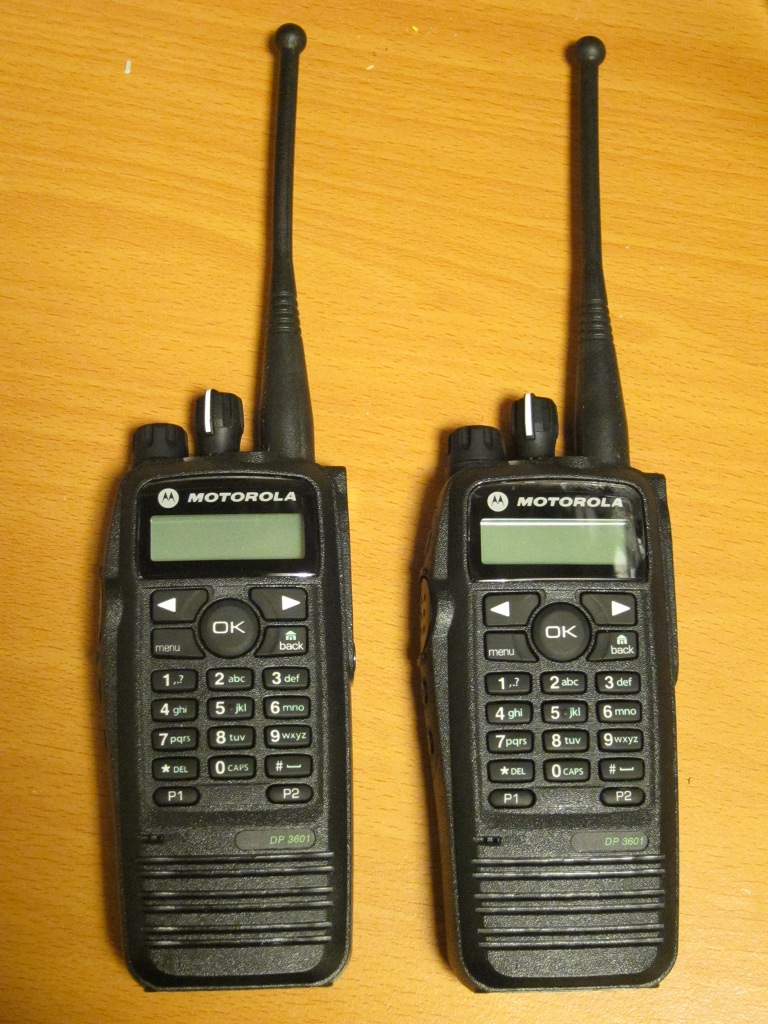
And, as you can see from the attached photo, I have some new toys for 70 cm. Built in GPS, text messaging, trunking support, rugged construction, submersible, digital and analog voice, and a few other nice features. And surprisingly inexpensive on ebay, when compared to new amateur HTs with APRS.

Friday, July 29, 2011

User preferences saved with user account

I did a quick upgrade last night. A few bugs were found immediately after the upgrade and needed to be fixed but no serious harm was done.

The upgrade includes revamped session and preferences storage. The user-visible change is that user preferences are now stored in the server backend and attached to your user account if you're logging in when saving the preferences. They will be used on other computers, browsers and mobile devices as long as you're logged in with the same account.

The preferences can still be saved if you're not logged in, in which case they're attached to a browser cookie.

A less visible change is that the settings and session cookies set in the browser are now much shorter - just random keys, instead of containing the whole settings or session data. This makes the HTTP requests smaller, which improves network performance marginally. On a slow mobile connection it might actually make a difference.

I don't have a related photo to attach, so kittens it is again! Buxus and Brassia, aged 6 weeks.

Tuesday, July 26, 2011

New view filters, alerts, out-of-order packet filtering and other features

I've just finished installing a rather large upgrade on aprs.fi. The upgrade comes with a couple of noticeable new features which everyone should get familiar with, a bunch of smaller style fixes and some tiny bug fixes. The web service was down for a while due to the database schema changes and engine upgrades. Only very little APRS data was lost - APRS-IS traffic was buffered during the database maintenance and processed later when the database was up again.

Here's a list of the major changes:

Complex but easy filters:

The old filters (APRS, AIS, Items+objects, WX) in the Preferences have been replaced by a whole new Filter tool button on the right side of the tool bar. It's the one which tries to look like a funnel (I'll have to work on the symbol image to make it more obvious).

Let's do a little exercise to get you started!

Deselect the All stations filter, so that no stations are displayed. Then enable the Station type: Weather filter and you'll only see stations transmitting weather data.

Next, continue by enabling Station class: APRS stations. At this point you'll see both APRS stations and weather stations, which doesn't make much sense since all the weather stations are also APRS stations. But it starts to make sense again if you click the red downward-pointing arrow for the weather stations, which throws them to the bottom of the list, in the red "AND NOT" department, effectively removing them from the display.

Now, click on the plus (+) button to add your own fancy filters to the list. For example, it's possible to create a filter which only shows APRS stations using Kenwood radios which are also acting as Digipeaters, but do not have a callsign starting with "OH2". That filter can then be used in the green "display any of these" side of filters (think of logical OR if you're into programming) or the red "but not these" side (think of AND NOT).

Once you're finished designing your favourite filter list, use the Save button to save it to a new named list. The default filter will reset to it's factory settings every time the map opens (so that you'll see something if you get lost with the filters). The filters are saved together with your user account, so you'll need to log in to save them. The upside of this is that you can easily use your preconfigured filters on many computers and even mobile devices!

Personally, I've set up several commonly used filter sets in my named lists, such as "Infra" for network infrastructure: digipeaters, igates, and "Moving" for stations which have their speed larger than 2.

New graphing engine:

Telemetry, weather and station graphs are displayed by a new third-party graphing engine instead of a homebrew one. The new engine reduces load on my servers (and adds some on the web browser's side, but that's OK since there are thousands of those against my 2), generates prettier line graphs, and will enable some really fancy interactive features in the future!

Station activity alerts:

This feature is mainly for digipeater and igate operators. It lets you know by email if your station stops working, or when it starts working again. Very handy especially if you're like me and maintain digipeaters far away from your home and would not otherwise notice when they go "kaput".

Click on the Favourites (star) tool button, then select My stations and bookmarks. Add your digipeaters in the Stations I follow list, and then click Settings for each of them and tune the timings.

Please note that due to APRS-IS duplicate filtering aprs.fi often does not get to know when your igate or digipeater hears a packet and repeats it. It's a good idea to set the "has not heard station" alert for a very long timer such as 24 or 48 hours, and then go down or up from there depending on the amount of false alarms!

An additional duplicate packet filter algorithm:

In addition to the old filtering methods, out-of-order and duplicate packets are now filtered using APRS timestamps embedded in the packets. If a packet comes in that has an older timestamp than the previous packet, it is promptly discarded. This should be a very effective duplicate filter when timestamps are transmitted by the tracker.

The raw packets display can now also display the decoded timestamp when using the Decoded mode.

Facelifts:

Since most people come to aprs.fi to look up a station's position, the callsign search box has been moved up on the right-side panel, and the time range selector has been moved down.

The real-time map displays a nice "loading" image until station data has been first received from the servers.

Buttons now have a prettier and consistent style everywhere. Some other layout and style tunings have been applied, too.

Bugfixes:

The real-time map's content reloading logic has been improved. It should now be more responsive when panning and zooming around. There's still a small bug in there - sometimes stations are not reloaded on the map when the filters are changed at precisely the right time. Oh well.

The sortable tables were not working in many views. Now they are. Click on table column headers to sort, ascending or descending.

PHG overlays are now correctly hidden when zooming out to area activity view.

The duplicate stations API bug was fixed.

As always, some smaller ones were fixed too. I also did some profiling and optimisation of old code, hoping to keep the performance of the code on similar level as before, even though new features were added in the critical code path.

Upgrades of third-party components:

Web server software, some operating system components, database engine, etc.

Post a note on the discussion group when you find a bug - this is such a large upgrade that I'm certain quite a few things don't work quite right from the start.

As usual, there are translations which need to be updated with the new features. Thank you for your ongoing support!

Friday, February 18, 2011

Google Latitude support on aprs.fi

It's now possible to upload your position to aprs.fi from Google Latitude. Latitude, in turn, supports uploading position from a large number of mobile devices (Android, iPhone, Blackberry, Nokia/Symbian, Windows Mobile) using Google's Maps and Latitude applications.

See the user guide section on Google Latitude support for instructions.

If you don't see your position immediately on aprs.fi, please wait for a few minutes, and check if Google Latitude has your position on it's own web site. If it isn't shown there, the problem lies with your mobile application's configuration or lack of accurate position information on the phone. aprs.fi currently rejects positions with an accuracy that is worse than 4000 meters.

The web stations page in the user guide is a new thing, too. In addition to Latitude support, it documents the manual updating (point-and-click) and Geolocation API (web browser with GPS support on a mobile device) methods for position updating.

Feedback welcome, as usual!